go all in and map out the full OAuth 2.0 Authorization Code with PKCE flow for your OpenWebUI MCP + Azure AD integration, showing every single step in the success path from the moment the user clicks “Connect” to when the MCP extension is fully authenticated.
Full OAuth 2.0 Success Path — OpenWebUI MCP + Azure AD
Copy code+---------+        +----------------+        +----------------+
|  User   |        | OpenWebUI MCP  |        | Azure AD (Entra)|
+----+----+        +-------+--------+        +--------+-------+
     |                     |                          |
(1)  | Click "Connect"     |                          |
     |-------------------->|                          |
     |                     |                          |
(2)  | Generate PKCE       |                          |
     | code_verifier &     |                          |
     | code_challenge      |                          |
     |                     |                          |
(3)  | Redirect user to    |                          |
     | Azure AD /authorize |                          |
     | with:               |                          |
     | - client_id         |                          |
     | - redirect_uri      |                          |
     | - response_type=code|                          |
     | - scope             |                          |
     | - state             |                          |
     | - code_challenge    |                          |
     | - code_challenge_method=S256                   |
     |-------------------->|                          |
     |                     |                          |
(4)  | Azure AD prompts    |                          |
     | login screen        |                          |
     |<--------------------|                          |
     | User enters creds   |                          |
     |-------------------->|                          |
     |                     |                          |
(5)  | Azure AD checks:    |                          |
     | - App exists ✅      |                          |
     | - Assignment req? ✅ |                          |
     | - User assigned ✅   |                          |
     | - MFA if required   |                          |
     |                     |                          |
(6)  | Consent screen      |                          |
     | (if first time)     |                          |
     |<--------------------|                          |
     | User grants consent |                          |
     |-------------------->|                          |
     |                     |                          |
(7)  | Azure AD issues     |                          |
     | authorization code  |                          |
     | + state             |                          |
     |-------------------->|                          |
     |                     |                          |
(8)  | OpenWebUI MCP       |                          |
     | validates state     |                          |
     |                     |                          |
(9)  | MCP sends POST to   |                          |
     | Azure AD /token     |                          |
     | with:               |                          |
     | - grant_type=code   |                          |
     | - code              |                          |
     | - redirect_uri      |                          |
     | - client_id         |                          |
     | - code_verifier     |                          |
     |-------------------->|                          |
     |                     |                          |
(10) | Azure AD validates  |                          |
     | code + PKCE         |                          |
     |                     |                          |
(11) | Azure AD returns:   |                          |
     | - access_token      |                          |
     | - refresh_token     |                          |
     | - id_token (JWT)    |                          |
     |<--------------------|                          |
     |                     |                          |
(12) | MCP stores tokens   |                          |
     | securely (encrypted)|                          |
     |                     |                          |
(13) | MCP uses            |                          |
     | access_token to     |                          |
     | call protected APIs |                          |
     |-------------------->|  Resource Server         |
     |                     |                          |
(14) | API returns data    |                          |
     |<--------------------|                          |
     |                     |                          |
(15) | When access_token   |                          |
     | expires, MCP uses   |                          |
     | refresh_token to    |                          |
     | get a new one       |                          |
     |-------------------->|                          |
     |                     |                          |
(16) | Azure AD returns    |                          |
     | new access_token    |                          |
     |<--------------------|                          |
     |                     |                          |
(17) | MCP continues to    |                          |
     | operate until user  |                          |
     | revokes consent or  |                          |
     | tokens expire       |                          |
Step Highlights
- PKCE (Steps 2 & 9) — Prevents interception of the authorization code.
- State (Steps 3 & 8) — Protects against CSRF attacks.
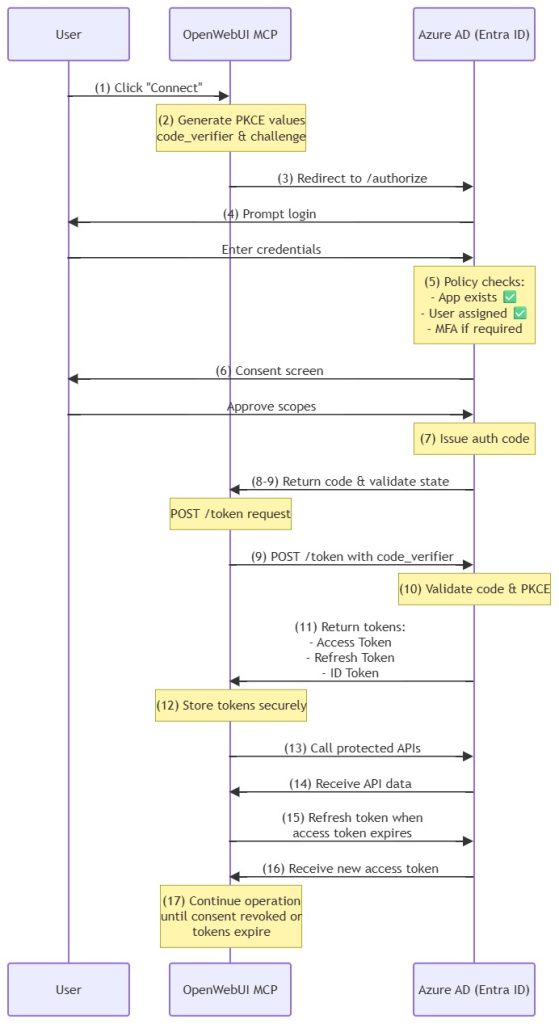
Diagram Notes
- PKCE steps (2, 9, 10) are critical for security in public clients like OpenWebUI MCP.
- State validation (Step 8) prevents CSRF attacks.
- Consent (Step 6) ensures the user explicitly approves scopes.
- Refresh token cycle (Steps 15–16) keeps the session alive without re-login.
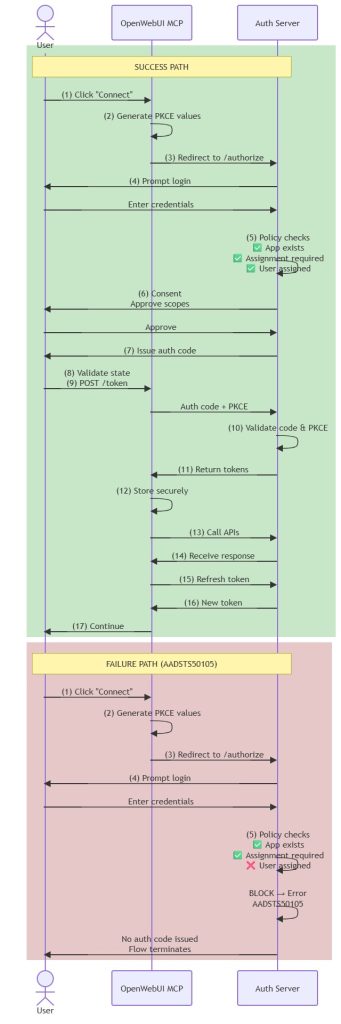
- Step 5 is the decision point:
- Success Path → User assigned → Flow continues to consent and token exchange.
- Failure Path → User not assigned → Azure AD returns AADSTS50105 and stops the flow.
- In the failure path, no authorization code is issued, so Steps 8–17 never occur.